
Starting with the concept of an ERP inventory system, this innovative tool revolutionizes inventory management in businesses, ensuring seamless operations and heightened efficiency.
Exploring its key features, benefits, and real-world applications, this system is a game-changer in modern business practices.
Overview of ERP Inventory System
An ERP inventory system is a software solution that integrates inventory management with other business processes to streamline operations and improve efficiency. It allows businesses to track inventory levels, orders, sales, and deliveries in real-time, providing a comprehensive view of the entire supply chain.
Key Features and Benefits
- Real-time inventory tracking: Businesses can monitor stock levels accurately and prevent stockouts or overstocking.
- Automated inventory control: The system can automate order processing, replenishment, and forecasting, reducing manual errors.
- Integration with other modules: ERP inventory systems can be integrated with accounting, sales, and procurement modules for seamless data flow and improved decision-making.
- Improved efficiency and productivity: By streamlining processes and providing real-time data, businesses can operate more efficiently and enhance productivity.
- Cost savings: By optimizing inventory levels, reducing waste, and improving order accuracy, businesses can save costs and increase profitability.
Examples of Industries
- Retail: Retailers use ERP inventory systems to manage multiple store locations, track sales, and optimize inventory levels.
- Manufacturing: Manufacturers utilize ERP inventory systems to track raw materials, work-in-progress inventory, and finished goods.
- Distribution: Distributors rely on ERP inventory systems to manage warehouses, fulfill orders, and track shipments.
- E-commerce: E-commerce businesses use ERP inventory systems to synchronize online and offline inventory, manage multiple sales channels, and ensure timely order fulfillment.
Importance of Implementing an ERP Inventory System
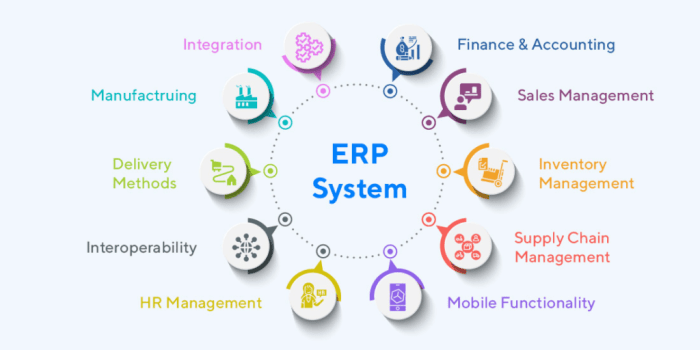
Implementing an ERP inventory system is crucial for modern businesses looking to stay competitive and efficient in today's fast-paced market. This integrated system offers a wide range of benefits that can significantly improve operations and decision-making processes.
Enhanced Inventory Management
- Real-time Tracking: An ERP inventory system provides real-time visibility into stock levels, allowing businesses to make informed decisions and prevent stockouts or overstock situations.
- Automation: By automating inventory control processes, such as ordering and reordering, businesses can reduce human error and ensure optimal stock levels at all times.
- Forecasting: With advanced forecasting tools, businesses can anticipate demand trends and plan their inventory levels accordingly, reducing carrying costs and improving cash flow.
Streamlined Operations
- Centralized Data: An ERP inventory system centralizes all inventory-related data in one platform, eliminating the need for manual data entry and reducing the risk of errors.
- Integrated Processes: By integrating inventory management with other business functions, such as sales and finance, businesses can streamline operations and improve overall efficiency.
- Enhanced Collaboration: With a shared database and real-time updates, employees across different departments can collaborate more effectively and make data-driven decisions.
Improved Customer Satisfaction
- Accurate Order Fulfillment: By having real-time inventory data, businesses can ensure accurate and timely order fulfillment, leading to improved customer satisfaction and loyalty.
- Optimized Supply Chain: An ERP inventory system helps businesses optimize their supply chain processes, reducing lead times and improving product availability, ultimately enhancing the customer experience.
- Personalized Service: With access to customer order history and preferences, businesses can offer personalized services and recommendations, creating a more engaging customer experience.
Key Components of an ERP Inventory System
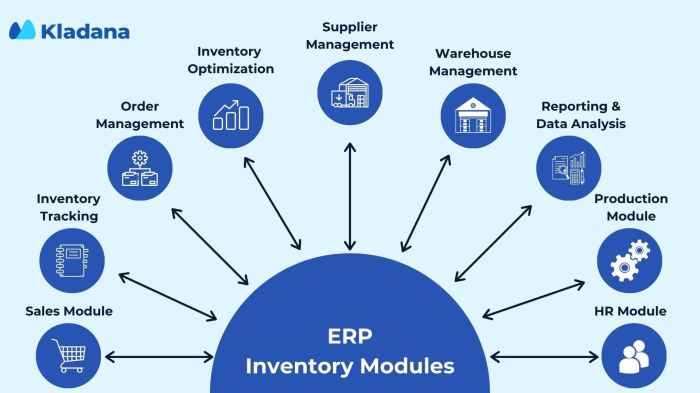
ERP inventory systems consist of several key components that work together to streamline inventory management processes and improve overall efficiency.
Inventory Management Module
The inventory management module is at the core of an ERP inventory system. It allows businesses to track and manage all aspects of their inventory, including stock levels, orders, and shipments. This module provides real-time visibility into inventory levels, helping businesses optimize stock levels and reduce carrying costs.
Order Management Module
The order management module within an ERP inventory system handles the entire order fulfillment process, from order placement to delivery. It automates order processing, tracks order statuses, and generates invoices. This module ensures accurate and timely order fulfillment, enhancing customer satisfaction.
Warehouse Management Module
The warehouse management module is responsible for optimizing warehouse operations, including receiving, picking, packing, and shipping. It helps businesses streamline warehouse processes, improve inventory accuracy, and reduce fulfillment errors. This module also enables businesses to track inventory movements within the warehouse in real-time.
Supplier Management Module
The supplier management module facilitates effective communication and collaboration with suppliers. It manages supplier information, tracks supplier performance, and automates procurement processes. This module helps businesses build strong supplier relationships, negotiate better terms, and ensure timely replenishment of inventory.
Reporting and Analytics Module
The reporting and analytics module provides businesses with valuable insights into their inventory performance. It generates customizable reports and dashboards, allowing businesses to analyze key metrics, identify trends, and make informed decisions. This module helps businesses optimize inventory levels, reduce costs, and improve overall operational efficiency.
Integration Module
The integration module plays a crucial role in connecting the ERP inventory system with other business systems, such as accounting software, CRM systems, and e-commerce platforms. It ensures seamless data flow between systems, eliminates data silos, and enables real-time information sharing.
This module enhances overall business visibility and efficiency.
Implementation Process of an ERP Inventory System
Implementing an ERP inventory system is a crucial process that requires careful planning and execution to ensure its success. Below, we will discuss the steps involved in implementing an ERP inventory system, best practices for a successful implementation, and common pitfalls to avoid during the process.
Steps in Implementing an ERP Inventory System
- 1. Planning Phase: This phase involves defining the goals and objectives of the ERP inventory system implementation, conducting a needs assessment, and creating a project plan.
- 2. System Selection: In this step, the organization selects the ERP inventory system that best fits its requirements and budget.
- 3. Data Migration: The next step involves transferring existing inventory data into the new ERP system, ensuring data accuracy and integrity.
- 4. Training and Testing: Employees need to be trained on how to use the new system effectively. Testing is also crucial to identify and resolve any issues before full implementation.
- 5. Go-Live and Evaluation: The system is officially launched, and its performance is monitored to ensure it meets the organization's requirements.
Best Practices for a Successful ERP Inventory System Implementation
- Engage stakeholders throughout the process to ensure their buy-in and support.
- Set realistic timelines and milestones to track progress effectively.
- Work closely with the ERP vendor to address any challenges and customize the system to meet specific needs.
- Regularly communicate with employees to gather feedback and address any concerns promptly.
Common Pitfalls to Avoid During the Implementation Process
- Avoid inadequate training for employees, leading to underutilization of the system.
- Skipping proper data migration can result in data inconsistencies and errors.
- Failure to involve key stakeholders can lead to resistance and lack of support for the new system.
- Ignoring the need for ongoing system maintenance and updates can hinder system performance in the long run.
Integration with Other Business Systems
Integrating an ERP inventory system with other business systems is crucial for streamlining operations and maximizing efficiency across different departments. By connecting various systems, businesses can ensure seamless data flow and real-time information sharing.
Examples of Systems that can be Seamlessly Integrated
- Customer Relationship Management (CRM) systems
- Supply Chain Management (SCM) systems
- Financial Management systems
- Point of Sale (POS) systems
Benefits of Cross-System Integration
Integrating an ERP inventory system with other business systems offers numerous benefits, including:
- Improved data accuracy and consistency across all systems
- Enhanced visibility and transparency in business operations
- Efficient decision-making through access to real-time information
- Streamlined processes and reduced manual data entry
- Cost savings by eliminating data silos and redundant tasks
Data Management and Reporting Capabilities
An ERP inventory system plays a crucial role in managing and processing data efficiently, providing real-time insights, and enabling informed decision-making.
Data Management in ERP Inventory System
Within an ERP inventory system, data management involves the collection, storage, organization, and processing of various types of inventory-related information. This includes product details, stock levels, supplier information, purchase orders, sales data, and more. By centralizing all this data in one system, organizations can streamline operations and ensure data accuracy.
Reporting Capabilities of ERP Inventory System
The reporting capabilities of an ERP inventory system allow users to generate customized reports based on specific parameters. These reports can provide insights into inventory levels, sales trends, supplier performance, and overall inventory health. With real-time reporting, stakeholders can make data-driven decisions promptly to optimize inventory management strategies.
For example, managers can track slow-moving inventory, identify potential stockouts, or analyze inventory turnover ratios through detailed reports generated by the ERP system.
Role of Data Analytics in Optimizing Inventory Management Decisions
Data analytics tools integrated into ERP inventory systems enable advanced data processing and analysis. By leveraging data analytics, organizations can forecast demand, identify patterns, and optimize inventory levels to prevent overstocking or stockouts. This data-driven approach enhances inventory management decisions, reduces costs, and improves overall operational efficiency.
Customization and Scalability
Customization and scalability are crucial aspects of an ERP inventory system that allow businesses to tailor the system to their specific needs and adapt to growth and changes over time.
Customization Options
- Business-specific workflows: Customizing workflows within the ERP system to align with the unique processes of the business, improving efficiency and accuracy.
- Reporting and analytics: Tailoring reports and dashboards to provide relevant insights and KPIs based on the specific requirements of the business.
- User roles and permissions: Setting up customized user roles and permissions to control access to sensitive data and functionalities within the system.
Scalability Benefits
- Increased capacity: The ability of the ERP system to handle larger volumes of data and transactions as the business grows without compromising performance.
- Flexibility: Scalability allows businesses to easily add new modules, features, or users to the system as needed, ensuring it can adapt to changing needs.
- Cost-effectiveness: Scalable systems offer a cost-effective solution as businesses can expand the system gradually without the need for a complete overhaul.
Examples of Customization and Scalability
- For a manufacturing company, customizing the inventory tracking module to include specific production stages and materials can streamline operations and improve inventory management.
- As an e-commerce business expands, the scalability of the ERP system allows for seamless integration with new sales channels and fulfillment centers, ensuring smooth order processing and inventory control.
- A retail chain can benefit from customization by implementing specialized promotions and pricing rules within the ERP system, while scalability ensures the system can support multiple stores with centralized inventory management.
Ending Remarks
In conclusion, the ERP inventory system emerges as a vital asset for businesses seeking to enhance productivity, streamline processes, and stay ahead in competitive markets.
FAQ Insights
How does an ERP inventory system benefit businesses?
An ERP inventory system improves efficiency, streamlines operations, and enhances inventory management processes.
Which industries commonly use ERP inventory systems?
Manufacturing, retail, e-commerce, and logistics are industries that frequently utilize ERP inventory systems.
What are the key components of an ERP inventory system?
Essential modules include inventory control, order management, warehouse management, and procurement.
How can customization and scalability benefit businesses using an ERP inventory system?
Customization allows tailoring the system to specific needs, while scalability ensures growth without hindrances.